
June 15, 2026
In-app Message, Smarter Push Automation, and Industry Screen Templates
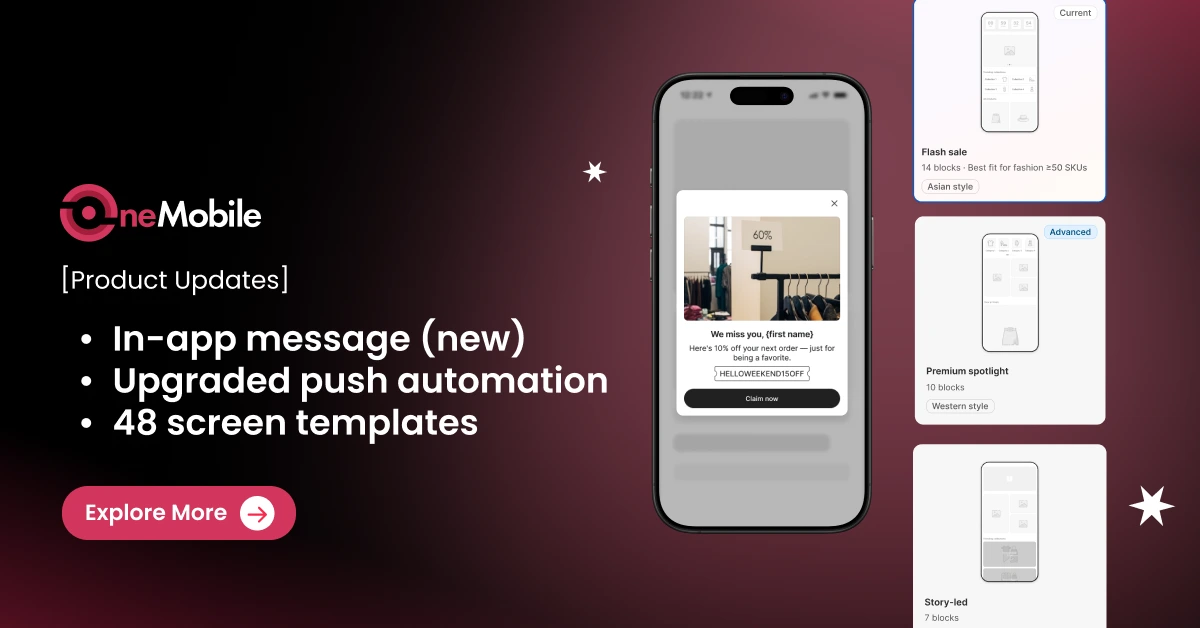
In this latest version of OneMobile, we’ve given you a second channel to reach app customers, smarter controls over how messages are delivered, and a faster way to optimize every of your mobile app screens.
Here’s a summary of the big improvements we made to OneMobile:
|
📢 Omni-channel messaging |
|
|
🎨 App design |
|
Omni-channel messaging: Ensure your messages always get through
Previously, missing a single push notification setup meant losing your only line of communication. With this upgrade, you gain a multi-channel system that works entirely in the background to ensure your messages always get through.
1. In-App Message (new): Another way to communicate with customers
We know how frustrating it is to put effort into a campaign, only for some shoppers to never see it. A missed push notification is a missed sale — and once that moment passes, there’s no way to bring it back. So we built in-app messages to make sure that doesn’t happen.
When a shopper opens your app, your message appears natively inside the store, right where their attention already is. Whether they missed the lock-screen alert or have push disabled entirely, the offer still gets through.
💡 Setup guide
- Go to the ‘Push notifications‘ tab
- Click ‘Send new push’.
- From there, you can compose and send both push and in-app messages at the same time, in the same place.
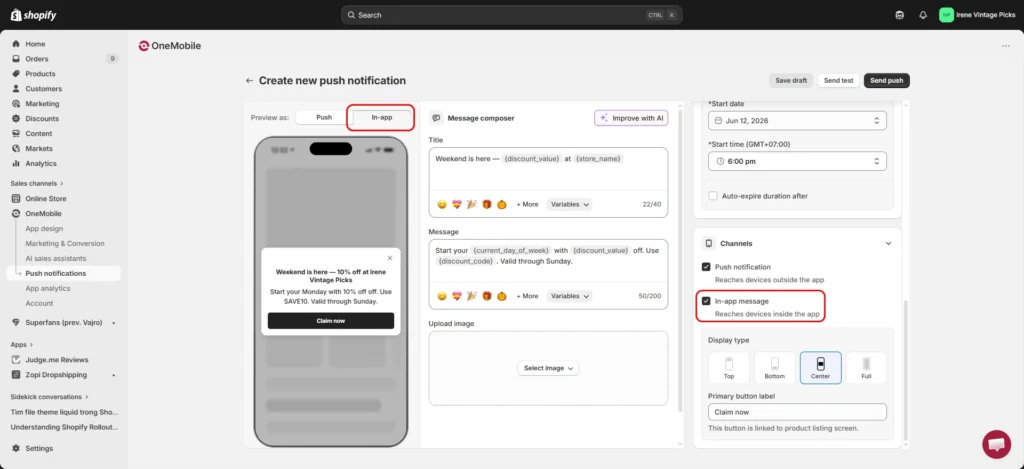
Both channels are enabled by default. To toggle either one, scroll down to the ‘Channels’ section. However, we suggest keeping both active to maximize your communication impact.
2. Smart Routing: Deliver the right message at the right time
Worry that sending both push and in-app messages will overwhelm your customers? Our Smart Routing engine won’t let that happen. With two channels available, we developed a Smart Routing system to ensure your push notifications and in-app messages complement each other well.
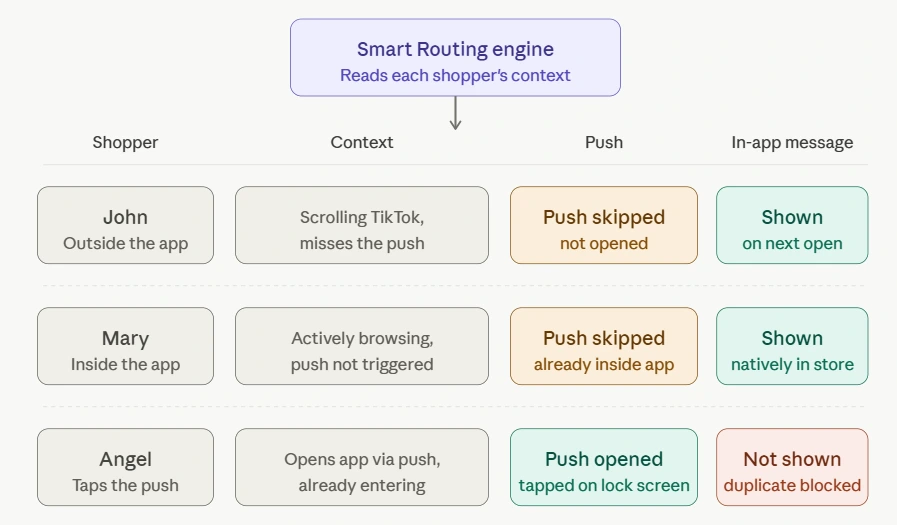
When you send a single campaign, our system reads each shopper’s current context and automatically determines which channel delivers the message — so shoppers still get your message while not being bombarded with the exact same message twice.
Here’s how Smart Routing works when you send both in-app messages and push notifications:
💡 Setup guide:
No setup needed on your side. Smart Routing automatically works when you send push notifications and in-app messages at the same time.
3. Push Health Check: Keep your deliverability strong
You’re now sending more messages, across more channels — but none of that matters if your sender reputation is quietly working against you.
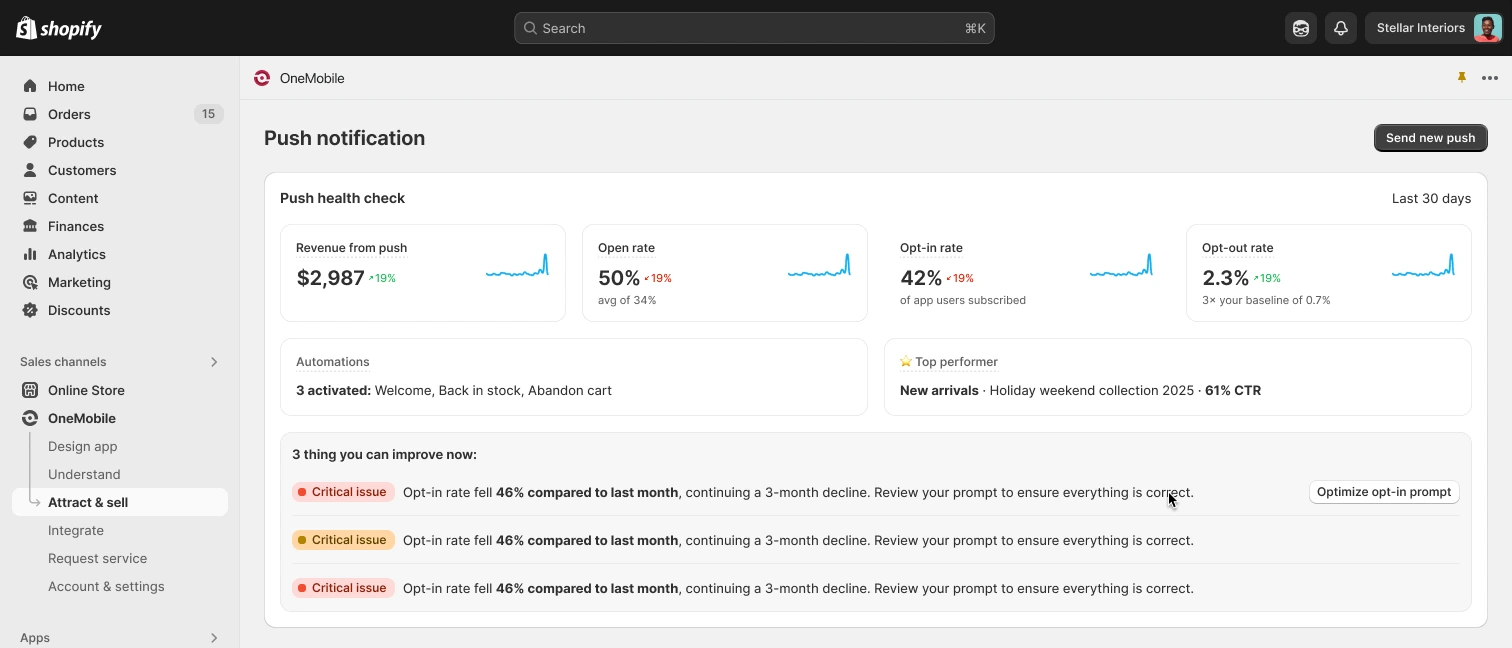
That’s why in this version, we also released Push Health Check, an advanced algorithm that always keeps your push notification deliverability healthy:
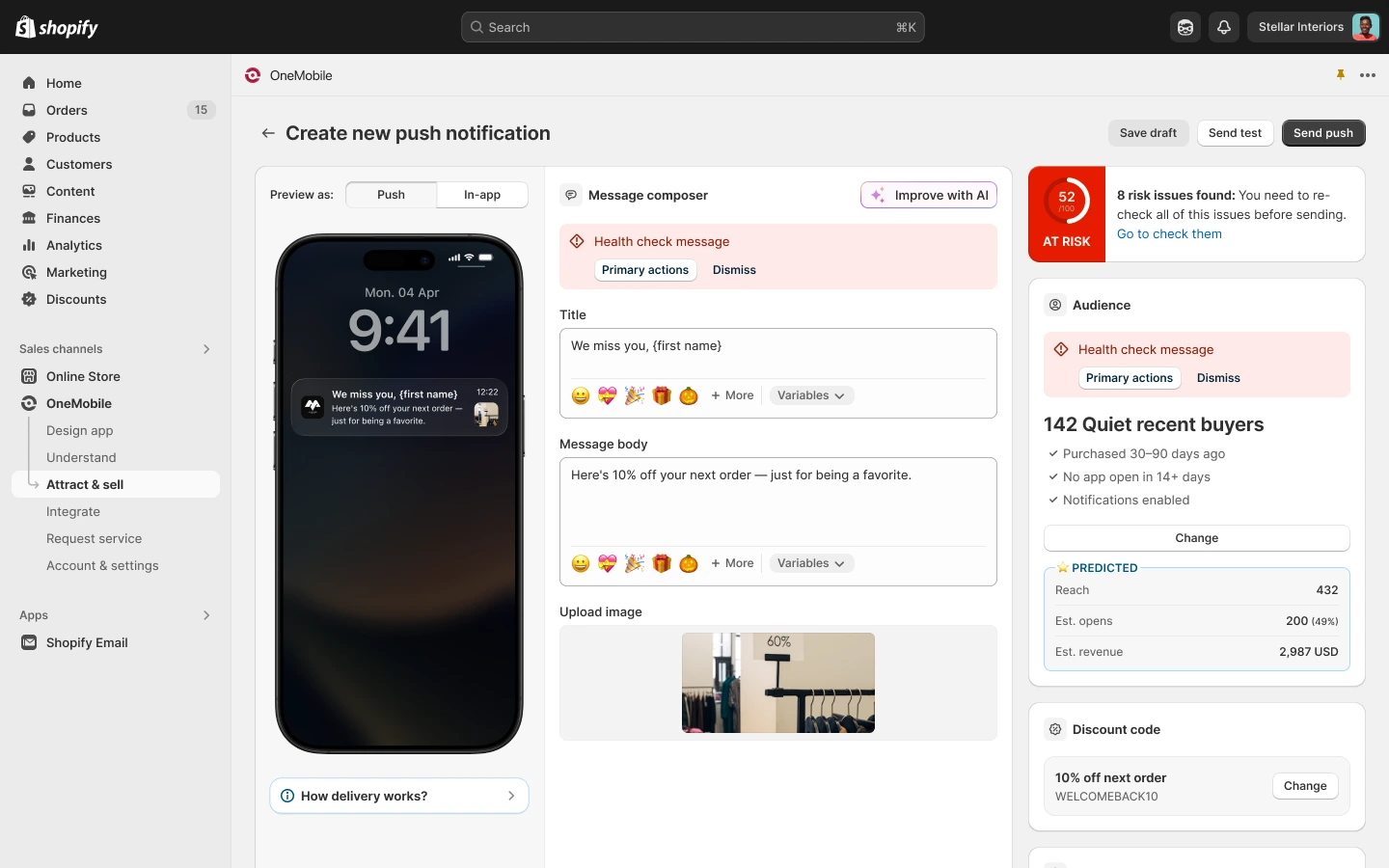
- Before you send: Right inside the message composer, the algorithm proactively predicts potential delivery issues, flagging warnings and recommending exact fixes before you hit send.
- After you send: The real-time dashboard provides a comprehensive look at your 30-day performance and suggests data-driven next steps to help continually refine your campaign health.
4. Upgraded Push Automation: More flows, more templates
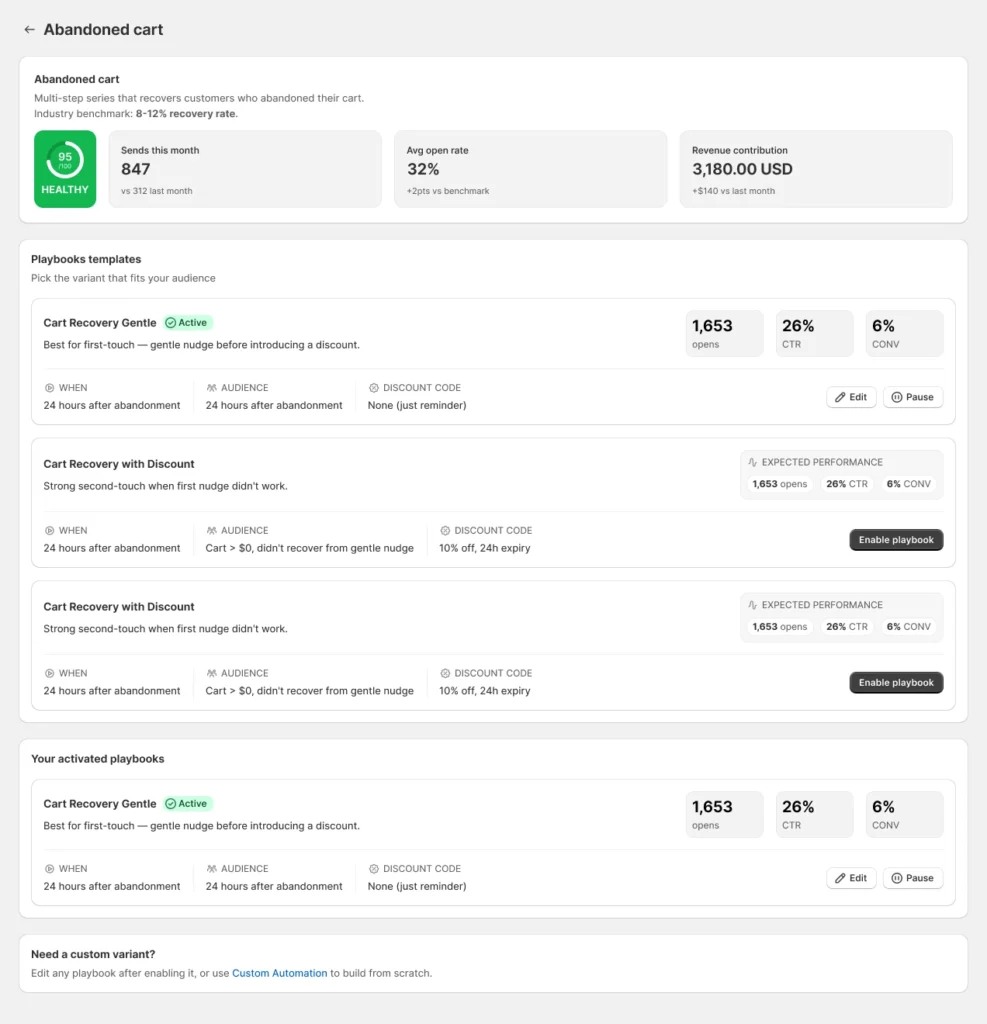
Recognizing the power of automated push notifications in driving hands-free retention and consistent revenue, we’d like to introduce you to 3 new automation flows: Replenishment Reminder, Browse Abandonment, and Post-Purchase.
The best part: Each automation flow now comes with ready-to-use playbooks that tell you exactly when the message goes out, who receives it, and whether a discount code is included.
💡 Setup guide:
- Go to the Push notifications tab
- Click Browse all templates > Click Automation
- Select the playbook you want and click Enable playbook
Screen Templates: Industry layouts optimized for conversions
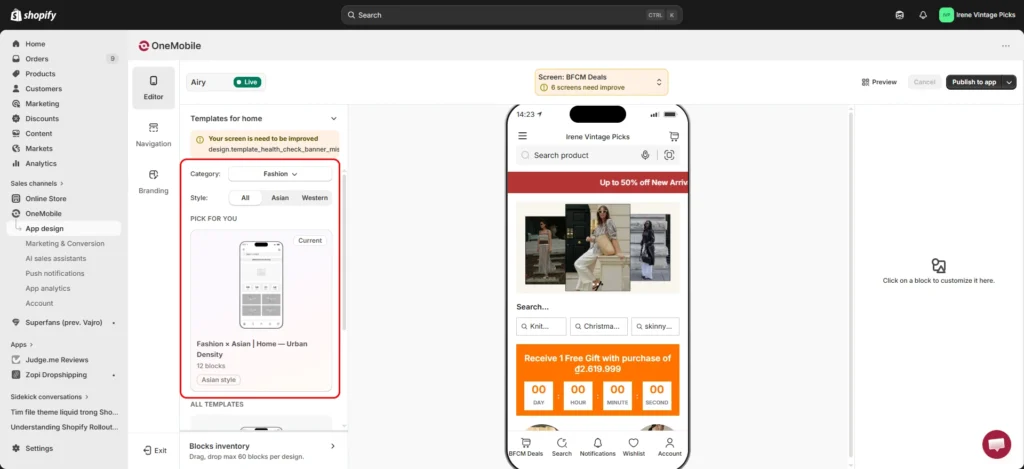
Every screen in your app is a chance to convert — and we wanted to make sure you’re not leaving any of them to chance. Previously, building each screen meant figuring out which blocks to use and dragging them in one by one. Now, it takes a single click.
To save you time, our team of eCommerce experts has designed a library of 48 industry-specific templates for every app screen based on proven industry best practices.
Rather than a one-size-fits-all solution, every layout is custom-tailored to the unique conversion objective of that specific screen. From driving product discovery on the Search screen to maximizing average order value (AOV) at the Cart, you can now effortlessly turn every square inch of your app into a high-converting surface.
💡 Setup guide:
- Navigate to the App design tab
- Select the screen you want to optimize
- Pick your industry
- Choose from the Templates panel on the left– whether it’s Western or Asian style
- Hit Apply template to screen and save draft or publish to app to publish your changes.
Feature Request: Tell us what to build next
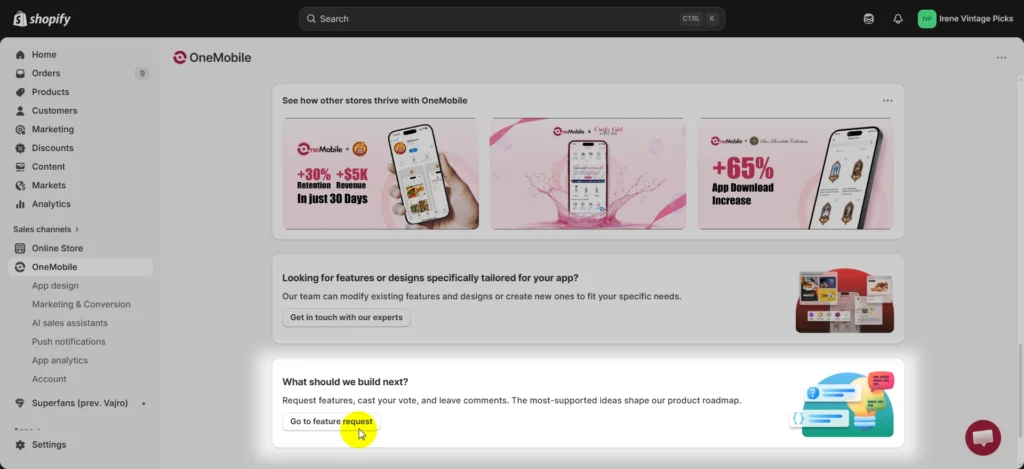
We believe the best product updates come directly from the merchants using them. To give you a clearer voice in how OneMobile evolves, we’ve launched a dedicated Feature Request section. This allows you to easily submit and upvote the capabilities you need to optimize your business, ensuring our product roadmap always aligns with your growth.
💡 Setup guide:
On the OneMobile main dashboard, scroll down and click Go to feature request. We’d love to hear your valuable ideas.
Wrapping up
This major release marks a significant step forward in how you engage and convert mobile shoppers. By combining multi-channel messaging, automated delivery controls, and industry-specific design templates, we now offer you a comprehensive ecosystem engineered to effectively boost your app’s revenue and streamline your operations.
Should you have any questions regarding these updates or wish to share your feedback, please reach out to our team:
- Email: [email protected]
- Live Chat: Log into your OneMobile account to connect with a support representative immediately.

OneMobile Team
Shopify Mobile App Builder
“OneMobile is the best Shopify Mobile App Builder that empowers merchants to effortlessly design, build, and launch fully-branded iOS and Android apps—without writing a single line of code. Transform your mobile presence into a high-converting sales channel with ease.”
Table of Contents
Table of Contents
Read more articles
Kick-Start Children's Day Campaign in Clicks — New Theme Just Dropped
By OneMobile Team
May 21, 2026
OneMobile’s Control App: Engage. Track. Update. All From Your Pocket
By OneMobile Team
January 26, 2026





